Working on a small demo, I was surprised by an unexpected circular dependency.
I built a repro to understand what was going on and I’m writing this post to fix what I found out for future memory.
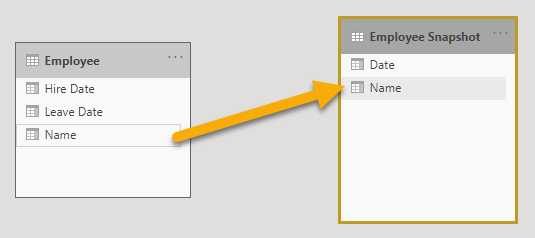
The model is very simple, I have a table Employee with the Name and the Hire and Leave dates
I’ve added a Date calculated table, created by CALENDARAUTO
Then I generated a Employee Snapshot table, with all the dates between the Hire and Leave dates for each employee.
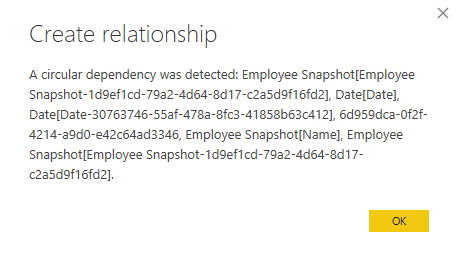
When I tried to create the relationship on the Name columns between the Employee and the Employee Snapshot tables, a Circular Dependency error was generated.
Trying the known techniques to solve the circular dependency on the Employee Snapshot DAX code didn’t work.
Eventually, the only solution I found was to replace the CALENDARAUTO with CALENDAR.
The Employee table in the repro is very simple, I created it directly with “Enter Data” button.

The code to create the Date table with CALENDARAUTO is straightforward
Date = CALENDARAUTO()
The code to create the Employee Snapshot, reduced to avoid context transitions and Time Intelligence function is
Employee Snapshot =
SELECTCOLUMNS(
    GENERATE(
        ALLNOBLANKROW( Employee ),
        FILTER (
            ALLNOBLANKROW( 'Date'[Date] ),
            'Date'[Date] >= 'Employee'[Hire Date] &&
            'Date'[Date] <= 'Employee'[Leave Date]
        )
    ),
    "Name", Employee[Name],
    "Date", 'Date'[Date]
)

Date =
VAR MaxEmployeeDate = MAX( MAX( Employee[Hire Date] ), MAX( Employee[Leave Date] ) )
VAR MinEmployeeDate = MIN( MIN( Employee[Hire Date] ), MIN( Employee[Leave Date] ) )
VAR MaxDate = DATE( YEAR( MaxEmployeeDate ), 12, 31 )
VAR MinDate = DATE( YEAR( MinEmployeeDate ), 1, 1 )
RETURN
    CALENDAR( MinDate, MaxDate )

The sample pbix can be downloaded from github
 Sergio Murru